


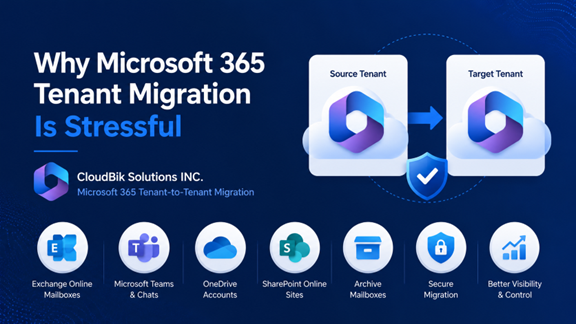
Microsoft 365 tenant-to-tenant migration has become one of the most important projects for modern IT teams. Businesses depend heavily on Microsoft 365 services such as Exchange Online, Microsoft Teams, OneDrive, and SharePoint for daily communication and collaboration. During mergers, acquisitions, tenant consolidations, or company rebranding, organizations often need to migrate all data securely from one tenant to another. However, the process can quickly become stressful if proper planning is not done. Questions like these keep IT administrators awake at night:
- Will users lose emails?
- What happens to Teams chats and OneDrive files?
- How much downtime will employees face?
- Can we migrate without affecting productivity?
CloudBik Solutions INC. helps organizations simplify Microsoft 365 Tenant to Tenant migration with secure and user-friendly migration solutions.
Why Businesses Perform Microsoft 365 Tenant Migration?
Organizations migrate Microsoft 365 tenants for multiple reasons including mergers and acquisitions, company restructuring, domain changes, tenant consolidation, compliance requirements, and organizational expansion. These projects involve migrating Exchange Online mailboxes, OneDrive data, SharePoint Online sites, Microsoft Teams, Teams chats, calendars, contacts, permissions, and archives.
A few Common Challenges IT Teams Face
- The biggest concern during migration is data loss. IT administrators worry about losing important emails, Teams conversations,
- SharePoint permissions, and OneDrive files.
- User downtime is another major issue because employees expect uninterrupted access to their data and communication tools.
- Migration projects also involve authentication challenges, DNS changes, Outlook profile configuration, permission mapping, and synchronization problems.
Why Are Native Migration Methods Difficult?
Many organizations initially try native Microsoft migration methods. Although Microsoft provides certain migration capabilities, they often require PowerShell scripting, manual configuration, advanced technical knowledge, and extensive troubleshooting. Large organizations with thousands of users may find native methods difficult to manage because of the complexity involved.
Some of the most common challenges with native migration methods include:
- Complex PowerShell Commands – IT administrators often need to execute lengthy PowerShell scripts, which can be difficult for teams without deep Microsoft 365 expertise.
- Limited Support for Teams Chat Migration – Native tools may not fully support migration of Microsoft Teams chats, private channels, or group conversations.
- Manual User Mapping – Administrators may need to manually map source and destination users, increasing the chances of configuration errors.
- High Risk of Downtime – Improper migration planning or DNS configuration can temporarily disrupt email delivery and user access.
- Permission and Sharing Issues – SharePoint permissions, OneDrive sharing links, and Teams memberships may not transfer correctly without additional manual work.
- Limited Reporting and Visibility – Native migration processes often provide limited real-time monitoring and reporting capabilities, making troubleshooting more difficult.
- Steep Learning Curve – Managing tenant migration through native methods requires strong technical knowledge of Microsoft 365 architecture, authentication, and compliance settings.
- Time-Consuming Process – Large-scale migrations involving thousands of mailboxes and files can take significant time when handled manually.
- Increased Administrative Workload – IT teams must constantly monitor synchronization, troubleshoot failed batches, and verify migrated data.
Because of these limitations, many businesses prefer automated Microsoft 365 migration solutions that simplify the migration process, reduce manual effort, and help minimize downtime.
Importance of User Communication
One of the most overlooked aspects of migration projects is user communication. Employees should clearly understand the migration schedule, expected downtime, password changes, and login instructions. Informing users in advance reduces confusion and minimizes support tickets after migration.
Best Practices for Successful Migration
IT teams should always perform pre-migration assessment, pilot testing, incremental synchronization, and staged migration batches. Running pilot migrations helps identify issues early while incremental migration ensures newly received emails and files are synchronized before final cutover. Proper testing significantly reduces migration risks.
How CloudBik Helps Businesses with Microsoft Cross-Tenant Migration?
Migrating Microsoft 365 data is not just a technical task — it directly impacts employee productivity, communication, and daily business operations. That’s why businesses need a migration solution that is secure, reliable, and easy to manage.
CloudBik Solutions INC. helps organizations simplify complex Microsoft 365 tenant-to-tenant migration projects with an automated and user-friendly migration platform designed specifically for modern IT teams.
Migrate Almost Every Microsoft 365 Workload with CloudBik
- Exchange Online mailboxes
- Microsoft Teams/Channels and Teams chats
- OneDrive accounts and shared files
- SharePoint Online sites and document libraries
- Archive mailboxes
- Shared and group mailboxes
Security and Compliance During Migration
Security remains one of the most important aspects of Microsoft 365 migration projects. Organizations must ensure sensitive business information remains protected throughout the migration process. Using secure Microsoft APIs and modern authentication methods helps businesses maintain compliance and protect user data.
Why do Automated Migration Tools Matter?
Modern migration tools reduce manual workload, improve migration speed, and simplify troubleshooting. Automated migration solutions help businesses reduce errors while improving reporting, monitoring, and migration consistency. Businesses can complete projects faster while reducing operational stress on IT teams.
Conclusion
Microsoft 365 migration projects require proper planning, reliable tools, and strong communication strategies. Using CloudBik for reliable Microsoft 365 migration can significantly reduce migration risks while improving the overall user experience. A successful migration is not just about moving data but ensuring employees continue working without disruption.
